Launching a token on Base in 2026 is one of the most strategic moves a project can make. With $4.46 billion in Total Value Locked (TVL), 9.19 million daily transactions, and direct access to Coinbase's 115 million verified users, Base has cemented itself as the leading Ethereum Layer 2 for consumer crypto and DeFi.
This guide gives you the exact steps, real costs, and specific tools to go from idea to live token — whether you are a non-coder using no-code tools or a developer deploying custom contracts.
This guide is part of the Aquads On-Chain Launch Playbook. For the foundational framework covering project vision, legal considerations, tokenomics, and universal launch strategies, start with the Complete Playbook for Launching On-Chain Projects in 2026.
What You Need Before You Start
Wallet & ETH Budget
You need a wallet that supports Base. The best options are Coinbase Wallet, MetaMask, or Rainbow. Add Base Mainnet manually if needed:
- Network Name: Base Mainnet
- RPC URL: https://mainnet.base.org
- Chain ID: 8453
- Currency Symbol: ETH
- Block Explorer: https://basescan.org
Budget at least 0.05 ETH (~$150–$200) for deployment, verification, and initial liquidity. If you plan to lock liquidity and pay for marketing, budget 0.2–0.5 ETH (~$600–$1,500).
Testnet Practice
Always deploy on Base Sepolia first. Get free test ETH from:
Understanding Base Architecture
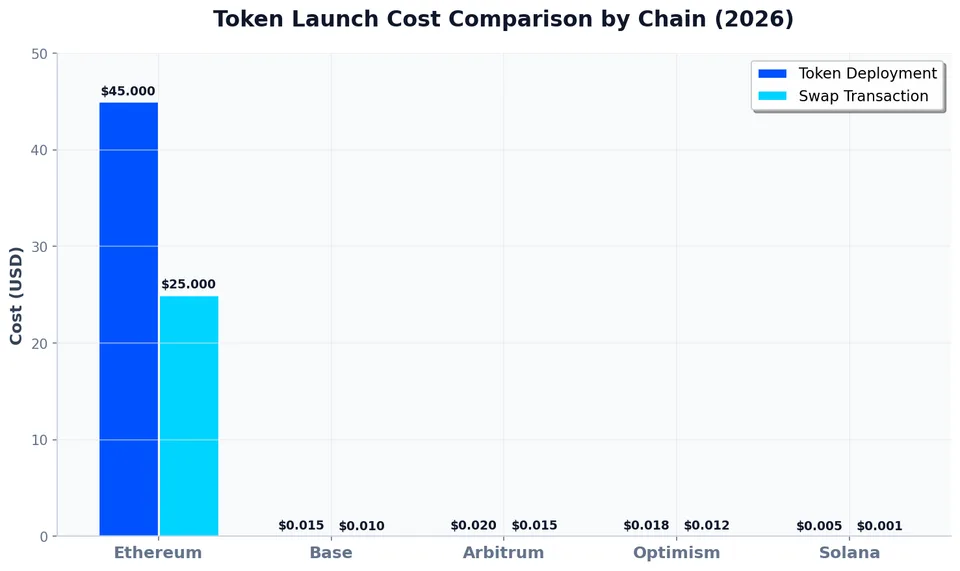
Base is an OP Stack rollup built by Coinbase. It is EVM-equivalent, meaning any Ethereum smart contract works out of the box. Gas costs are 10x–100x lower than Ethereum mainnet.
Key 2026 developments:
- B20 Standard: Introduced in the June 2026 Beryl upgrade, B20 is Base's optimized token standard that reduces gas costs by an additional 15–20% for common transfers. Most launchpads now support it alongside ERC-20.
- Smart Wallet: Coinbase's Smart Wallet uses account abstraction (ERC-4337), allowing users to onboard without seed phrases. Your token should be compatible with paymasters for gasless transactions.
Wallet Setup for Base Chain
Browser Extension Wallets (Best for Desktop)
Coinbase Wallet
Built by the same team as Base. Native Base support — no manual network add needed.
Has a built-in bridge to move ETH from Ethereum to Base.
Best for: Beginners and anyone who wants the smoothest Base experience.
Download: https://wallet.coinbase.com/
MetaMask
The most widely used wallet. You must add Base Mainnet manually (RPC details below).
Best for: Power users, developers, and anyone already using MetaMask for other chains.
Download: metamask.io
Rabby
A newer wallet that auto-detects chains and shows exact USD values for every transaction before you sign.
Native Base support. Shows you exactly what tokens you are swapping and receiving.
Best for: DeFi power users who want safety warnings before every transaction.
Download: rabby.io
Rainbow
Clean UI, native Base support, great for NFTs and social features.
Best for: Design-focused users and mobile-first experience.
Download: rainbow.me
Trust Wallet
Multi-chain support including Base. Built-in swap feature.
Best for: Users who hold assets across many chains.
Download: Trust Wallet
Hardware Wallets (For Large Holdings / Treasuries)
Connects to MetaMask or Rabby via USB or Bluetooth.
Your private keys never leave the device.
Best for: Project treasuries, team multisigs, or anyone holding >$10,000 in tokens.
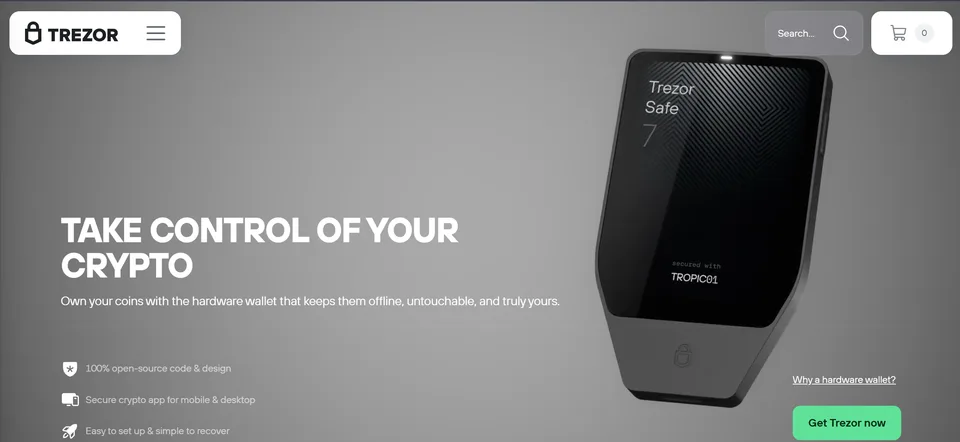
Open-source firmware. Connects to MetaMask.
Best for: Security purists.
Smart Wallets (Account Abstraction)
Coinbase Smart Wallet
Launched in 2024, now standard in 2026. No seed phrase needed — uses passkeys (Face ID / fingerprint).
Supports paymasters: users can pay gas in your token instead of ETH, or you can sponsor gas entirely.
Best for: Onboarding non-crypto users. If your target audience is mainstream consumers, this is critical.
Setup: Available inside the Coinbase Wallet app or at keys.coinbase.com
How to Add Base to MetaMask (Step-by-Step)
Open MetaMask → Click the network dropdown (top center).
Click "Add Network" → "Add a network manually".
Enter these exact values:
Network Name: Base Mainnet
New RPC URL: https://mainnet.base.org
Chain ID: 8453
Currency Symbol: ETH
Block Explorer URL: https://basescan.org
Click Save. You are now on Base.
How to Add Base to Rabby
Install Rabby from rabby.io.
It auto-detects Base when you visit any Base dApp.
Or go to Settings → Custom Networks → Add Base with the same RPC details above.
Which Wallet Should You Use?
If You Are... | Use This Wallet |
|---|---|
A beginner launching your first token | Coinbase Wallet |
A developer deploying contracts | MetaMask + Ledger |
A DeFi trader managing liquidity | Rabby |
Targeting mainstream consumers | Coinbase Smart Wallet |
Holding a project treasury | Safe{Wallet} multisig + Ledger |
Step 1A: Choose Your Token Type
For 99% of projects, a standard ERC-20 (or B20) token is correct. Ask yourself:
Feature | Do You Need It? | Recommendation |
|---|---|---|
Minting new tokens later | Yes | Include |
Burning tokens | Yes | Include |
Pausing transfers | Yes | Include |
Blacklisting wallets | No | Avoid unless legally required |
Transfer taxes | Yes | Add fee logic (common for memecoins) |
Anti-bot | Yes | Add launch delay or max-wallet limits |
Decision: If you need none of these, use a standard OpenZeppelin ERC-20. If you need taxes, anti-bot, or max wallet limits, use a no-code launchpad or a pre-audited template.
Step 1B: Design Your Tokenomics
This is where most token launches fail — not because the code was wrong, but because the economics were broken. Before you write a single line of code or click "Create Token," you need a clear economic model. Tokenomics is the difference between a token that holds value and one that dumps to zero in 48 hours.
Total Supply: Fixed vs. Inflationary
Fixed Supply (Recommended for most projects)
You mint the entire supply at launch and never create more.
Best for: Memecoins, governance tokens, community projects.
Examples: 1 billion tokens, 10 million tokens, 21 million tokens.
Rule of thumb: For community tokens, 1 billion is the standard. For DeFi protocols, 10–100 million feels more scarce.
Inflationary Supply (Advanced)
New tokens are minted over time via staking rewards, emissions, or protocol fees.
Best for: DeFi protocols, yield farming, long-term ecosystems.
Warning: Inflation without demand is death. If you print tokens faster than people want them, price collapses.
Allocation Breakdown: The Golden Ranges
Here is what a healthy token allocation looks like. Deviating too far from these ranges is a red flag to investors.
Category | Healthy Range | What It Covers |
|---|---|---|
Community / Airdrops | 30–60% | Early users, testnet participants, ecosystem rewards |
Liquidity | 10–20% | DEX pools, CEX market making, LP incentives |
Team + Advisors | 10–20% | Founders, core contributors, advisors |
Investors | 10–20% | Founders, core contributors, advisors |
Treasury / Ecosystem | 10–20% | Grants, partnerships, future development |
Reserve | 5–10% | Emergency fund, unexpected needs |
Critical rules:
Team + Investors combined should never exceed 40%. If insiders hold 50%+, the community will treat it as a cash grab.
Liquidity must be at least 10%. Less than this and your token will be impossible to trade without massive slippage.
Community allocation should be the largest slice. This signals that the project is community-first, not insider-first.
Vesting Schedules: The Anti-Dump Mechanism
Vesting means tokens unlock gradually over time instead of dumping on day one. This is non-negotiable for team and investor allocations.
Standard Vesting Framework:
Group | Cliff | Vesting Period | Unlock Pattern |
|---|---|---|---|
Team | 6–12 months | 24–36 months | Linear monthly unlocks after cliff |
Investors | 3–6 months | 12–24 months | Linear monthly or quarterly unlocks |
Community Airdrops | 0–3 months | 6–12 months | Immediate or linear depending on size |
Liquidity | 0 months | Immediate | 100% unlocked at launch for the pool |
Ecosystem Grants | 0–6 months | 12–48 months | Milestone-based or linear |
What "Cliff" Means: No tokens unlock for the first X months. If a team member leaves before the 12-month cliff, they get nothing. This aligns long-term incentives.
What "Linear" Means: After the cliff, tokens unlock evenly every month. So 24-month vesting = 1/24 of the allocation unlocks each month.
Red flags that kill projects:
No cliff: Team can dump everything on day one.
Short vesting (<12 months for team): Signals the team doesn't believe in the long term.
Large unlocks on the same day: Even with vesting, if 20% of supply unlocks on a single day, price crashes. Spread unlocks out.
Demand Drivers: Why Would Anyone Buy Your Token?
A token without utility is a lottery ticket. You need at least one clear reason for sustained demand:
Demand Driver | How It Works | Best For |
|---|---|---|
Governance | Holders vote on protocol decisions | DAOs, DeFi protocols |
Fee Sharing | Protocol revenue is distributed to stakers | DeFi, marketplace tokens |
Staking Rewards | Lock tokens to earn more tokens or ETH | Long-term community building |
Gas / Transaction Fees | Token is required to use the product | App-specific utility |
Discounts | Pay in token for cheaper fees | Marketplaces, SaaS |
Access | Hold token to access premium features | Membership, gaming |
Speculation / Meme | Community belief drives value | Memecoins, social tokens |
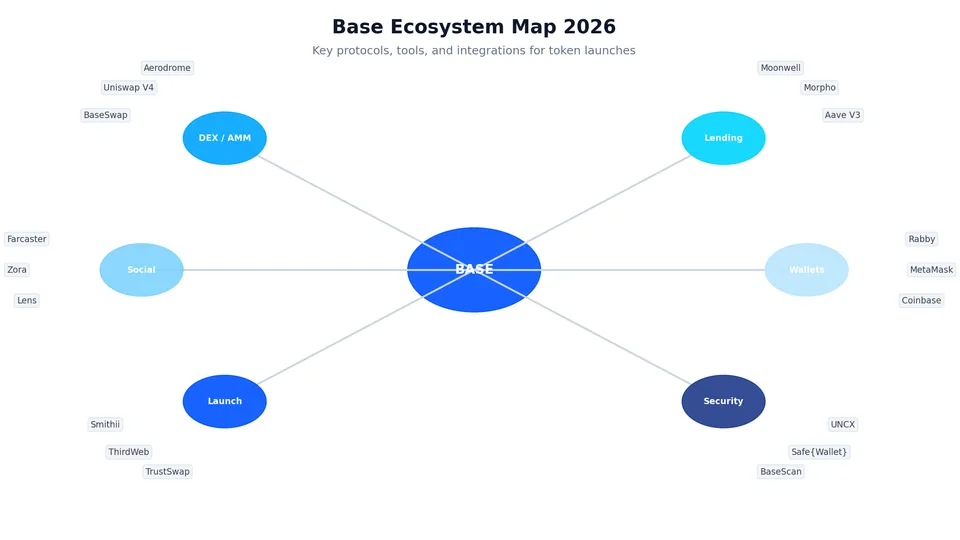
The Base-specific advantage: If your token integrates with Base's ecosystem (Aerodrome gauges, Farcaster Frames, Zora NFTs), that creates built-in demand loops. A token that can be used across Base apps is more valuable than one that sits in a wallet.
Modelling Tools: Plan Before You Launch
Don't guess your tokenomics. Use these tools to model different scenarios:
Tool | What It Does | URL |
|---|---|---|
Tokenomics DAO Calculator | Tokenomics DAO Calculator | |
TokenUnlocks | Research existing projects' unlock schedules to benchmark | |
Messari Tokenomics | Compare your design to top projects in your category | |
CMC Watchlist | Track competitor tokens' price action post-launch | |
Simple Spreadsheet | Build your own model with basic formulas | Google Sheets / Excel |
Minimum viable modeling: Open a spreadsheet. List every allocation category, the percentage, the cliff, and the vesting period. Calculate how many tokens unlock on day 1, day 30, day 90, day 180, and day 365. If more than 5% of total supply unlocks on any single day, redesign.
Tokenomics Checklist Before Deployment
[ ] Total supply is decided and justified (why 1B? why 10M?)
[ ] Allocation adds up to exactly 100%
[ ] Team + Investors combined is ≤40%
[ ] Liquidity allocation is ≥10%
[ ] Community allocation is the largest single slice
[ ] Team vesting has a 6–12 month cliff and 24+ month linear vesting
[ ] Investor vesting has a 3–6 month cliff and 12+ month linear vesting
[ ] At least one clear demand driver is defined
[ ] Unlock schedule has been modelled in a spreadsheet or tool
[ ] No single day has >5% of supply unlocking
If you cannot check every box, do not launch yet. Bad tokenomics is the #1 cause of post-launch death spirals. It is easier to fix on a spreadsheet than on a live contract.
Step 2A: No-Code Route (Fastest)
If you do not code, use these tools. They work in 2026 and are actively maintained.
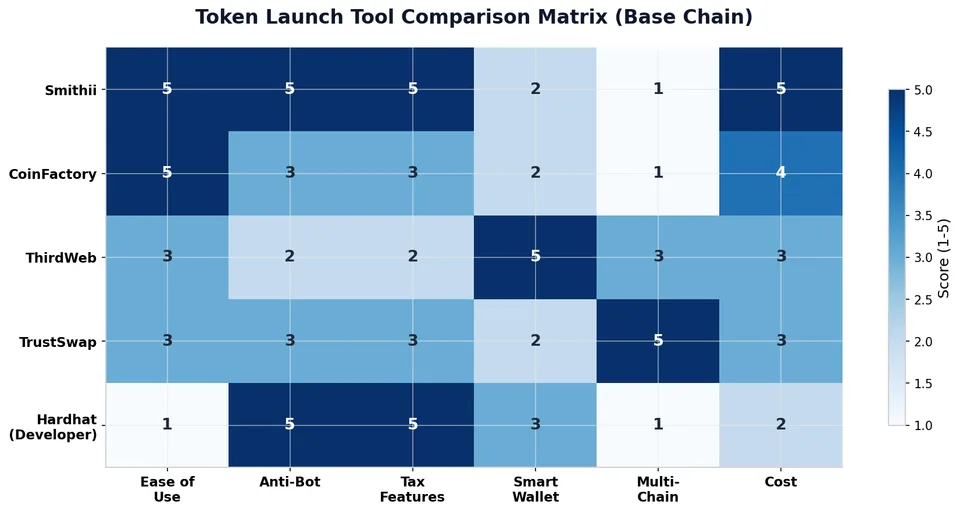
Smithii Token Creator
URL: https://smithii.io/create-token/base
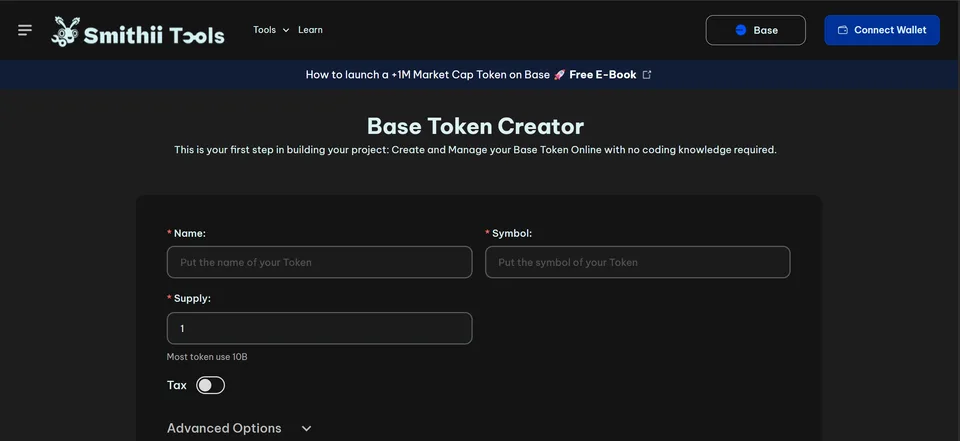
1. Connect your wallet (switch to Base Mainnet).
2. Enter token name, symbol, decimals (usually 18), and total supply.
3. Enable features:
- Anti-bot: Prevents sniper bots from buying in the first 2–5 blocks.
- Anti-whale: Sets a maximum wallet limit (e.g., 2% of supply).
- Tax: Set buy/sell tax (e.g., 5% marketing, 2% liquidity).
- Airdrop Mode: Distribute tokens to a list of addresses before launch.
4. Click Create Token.
5. Pay the deployment fee (~0.01–0.02 ETH + tool fee of ~0.01 ETH).
Cost: ~$50–$100 total.
CoinFactory
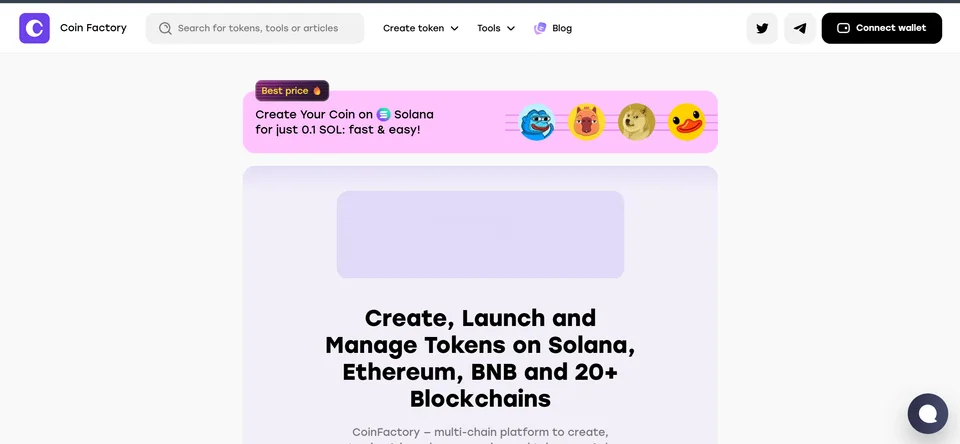
Best for creating a token with a built-in landing page. Good for community coins and fair launches.
ThirdWeb
URL: https://thirdweb.com/base
Best for account abstraction integration. If you want users to interact with your token without paying gas (using Smart Wallet paymasters), deploy here.
TrustSwap Launchpad
Best if you want a multi-chain launch. You can launch simultaneously on Base and Ethereum.
Step 2B: Developer Route (Maximum Control)
If you are a developer, use Hardhat or Foundry.
Hardhat Configuration
Install dependencies:
```bash
npm install --save-dev hardhat @nomicfoundation/hardhat-toolbox
npm install @openzeppelin/contracts
hardhat.config.js:
require("@nomicfoundation/hardhat-toolbox");

module.exports = {
  solidity: "0.8.20",
  networks: {
    base: {
      url: "https://mainnet.base.org",
      accounts: [process.env.PRIVATE_KEY],
      chainId: 8453
    },
    baseSepolia: {
      url: "https://sepolia.base.org",
      accounts: [process.env.PRIVATE_KEY],
      chainId: 84532
    }
  },
  etherscan: {
    apiKey: {
      base: process.env.BASESCAN_API_KEY
    },
    customChains: [
      {
        network: "base",
        chainId: 8453,
        urls: {
          apiURL: "https://api.basescan.org/api",
          browserURL: "https://basescan.org"
        }
      }
    ]
  }
};
Smart Contract Code
// SPDX-License-Identifier: MIT
pragma solidity ^0.8.20;

import "@openzeppelin/contracts/token/ERC20/ERC20.sol";
import "@openzeppelin/contracts/access/Ownable.sol";
import "@openzeppelin/contracts/security/Pausable.sol";

contract MyToken is ERC20, Ownable, Pausable {
    uint256 public constant MAX_SUPPLY = 1_000_000_000 * 10**18;
    uint256 public maxWalletPercent = 200; // 2%
    bool public tradingEnabled;

    mapping(address => bool) public blacklist;

    event TradingEnabled();

    constructor(address initialOwner)
        ERC20("MyToken", "MTK")
        Ownable(initialOwner)
    {
        _mint(initialOwner, MAX_SUPPLY);
    }

    function enableTrading() external onlyOwner {
        require(!tradingEnabled, "Already enabled");
        tradingEnabled = true;
        emit TradingEnabled();
    }

    function _beforeTokenTransfer(address from, address to, uint256 amount)
        internal
        override
        whenNotPaused
    {
        require(!blacklist[from] && !blacklist[to], "Blacklisted");
        if (from != owner() && to != owner() && tradingEnabled) {
            uint256 maxWallet = (totalSupply() * maxWalletPercent) / 10000;
            require(balanceOf(to) + amount <= maxWallet, "Max wallet exceeded");
        }
        super._beforeTokenTransfer(from, to, amount);
    }

    function burn(uint256 amount) public {
        _burn(msg.sender, amount);
    }

    function pause() public onlyOwner {
        _pause();
    }

    function unpause() public onlyOwner {
        _unpause();
    }

    function setBlacklist(address account, bool status) external onlyOwner {
        blacklist[account] = status;
    }
}
Deploy & Verify
1. Compile: npx hardhat compile
2. Deploy to Base Sepolia first: npx hardhat run scripts/deploy.js --network baseSepolia
3. Test thoroughly.
4. Deploy to Base Mainnet: npx hardhat run scripts/deploy.js --network base
5. Verify on BaseScan: npx hardhat verify --network base DEPLOYED_CONTRACT_ADDRESS "INITIAL_OWNER_ADDRESS"
Deployment gas cost: ~0.003–0.008 ETH (~$10–$25).
Step 3: Create Liquidity
Without liquidity, nobody can buy or sell your token. In 2026, Aerodrome dominates Base with 61% of all DEX volume.
Aerodrome (Recommended)
URL: https://aerodrome.finance
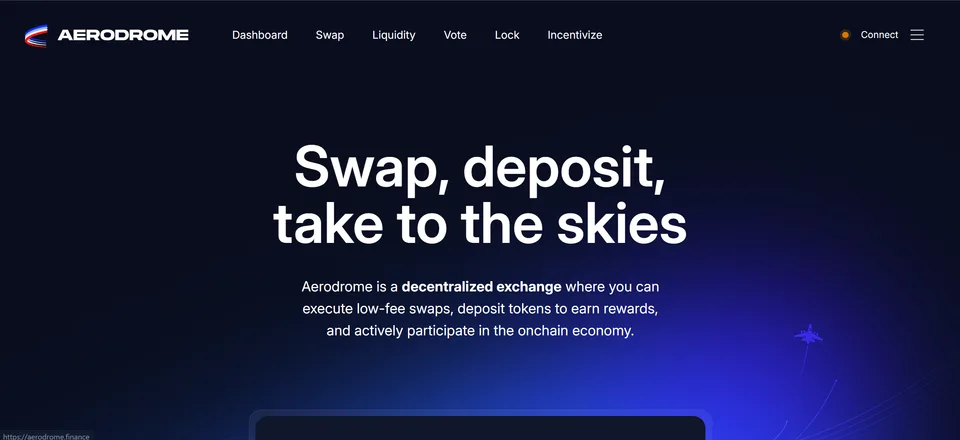
1. Go to Pools → Create Pool.
2. Select your token and pair it with ETH or USDC.
3. Choose the pool type:
- Volatile: For most tokens. Standard 0.3% fee.
- Stable: Only if your token is a stablecoin.
4. Enter the amount of tokens and ETH/USDC you want to seed.
5. Approve both tokens and confirm the transaction.
Minimum recommended liquidity: $5,000–$20,000 worth of ETH/USDC. Anything less makes your token extremely volatile and vulnerable to price manipulation.
Uniswap V3 (Alternative)
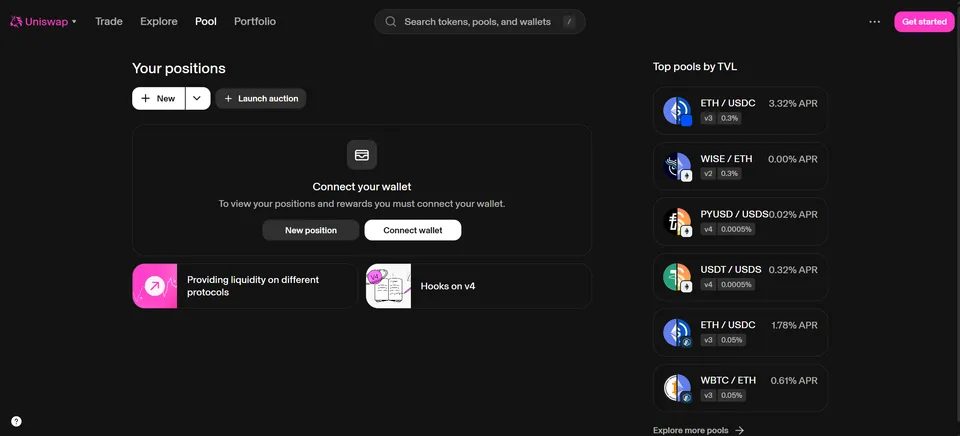
Use if you want concentrated liquidity. You set a price range, which is more capital-efficient but requires active management.
Lock Your Liquidity
Lock your LP tokens for 6–12 months minimum. Use:
- UNCX (Unicrypt): https://app.uncx.network
- Team Finance: https://team.finance
Why: If you remove liquidity early, your community will call it a rug pull. Locking builds trust.
Step 4: Security & Verification
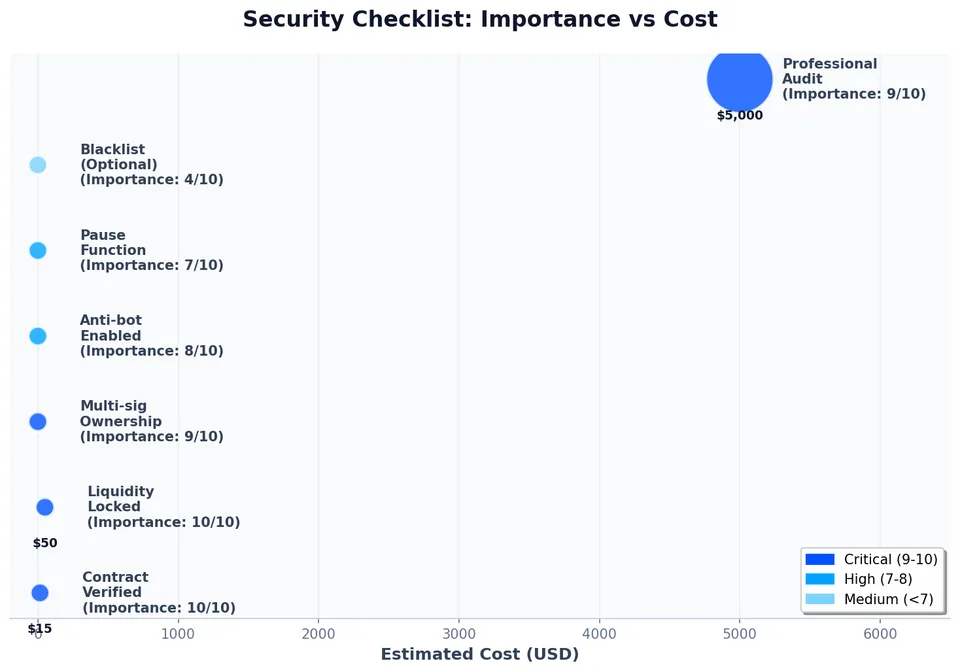
BaseScan Verification
1. Go to https://basescan.org.
2. Find your contract.
3. If you used Hardhat, verification is automatic. If not, go to Contract → Verify and Publish.
4. Upload your Solidity file and compiler version.
5. Once verified, the Code tab shows a green checkmark.
Revoke Dangerous Authorities
If you used a no-code tool or included owner-only functions, you must revoke them after launch:
Authority | When to Revoke | Cost |
|---|---|---|
Minting | After final supply is set | ~0.001 ETH ($3) |
Pause | After 30–90 days of stability | ~0.001 ETH ($3) |
Blacklist | Only if legally required | Keep or revoke |
Ownership | After setting up multisig | ~0.001 ETH ($3) |
Best practice: Transfer ownership to a Safe{Wallet} multisig (https://app.safe.global) with 3+ signers and a 2-of-3 threshold.
Anti-Bot Setup
If your contract does not have built-in anti-bot, use a launchpad that does, or add a delay:
- Block the first 3 blocks after liquidity is added.
- Set a max wallet of 1–2% of supply.
- Set a max transaction of 0.5–1% of supply.
Step 5: Marketing on Base
Base has a unique culture. The community is active on Farcaster and expects transparency.
Essential Channels
- Post your contract address and BaseScan link in your bio.
- Share the tokenomics thread.
- Tag @BuildOnBase and @CoinbaseWallet.
- Create a channel for your project.
- Use Frames to let users buy your token directly inside Farcaster feeds.
- Base's core community lives here. Ignore Farcaster and you ignore Base.
- Create a group with a verification bot (e.g., Rose or Combot).
- Pin the contract address, BaseScan link, and Aerodrome pool link.
- Use for deeper community engagement and announcements.
- Set up a ticket system for support.
- Update your token profile with logo, description, and social links.
- This is where most Base traders check prices.
- Post-launch stack for after launch
- Free token listing discovery system
Influencer Tiers (2026 Rates)
Tier | Followers | Cost | Best For |
|---|---|---|---|
Micro | 5K–50K | $200–$1,000 | Niche DeFi/Base community |
Mid | 50K–200K | $1,000–$5,000 | Initial volume boost |
Macro | 200K+ | $5,000–$20,000 | Major launch announcements |
Step 6: Community Growth Tactics
Base Ecosystem Grants
Apply for Base Builder Grants ($5,000–$50,000) at:
- Coinbase Ventures (for high-growth projects)
Targeted Airdrops
Use Gitcoin Passport or World ID to prevent sybil attacks. Airdrop to:
- Early Discord/Telegram members
- Farcaster channel participants
- Users who interacted with your testnet
Aerodrome Bribes
If you have a gauge on Aerodrome, bribe veAERO voters to direct emissions to your pool. This increases yield for LPs and deepens your liquidity.
Zora Cross-Promotion
Mint a free or paid NFT collection on Zora (Base's native NFT protocol) to attract collectors who may also buy your token.
Step 7: Post-Launch Timeline
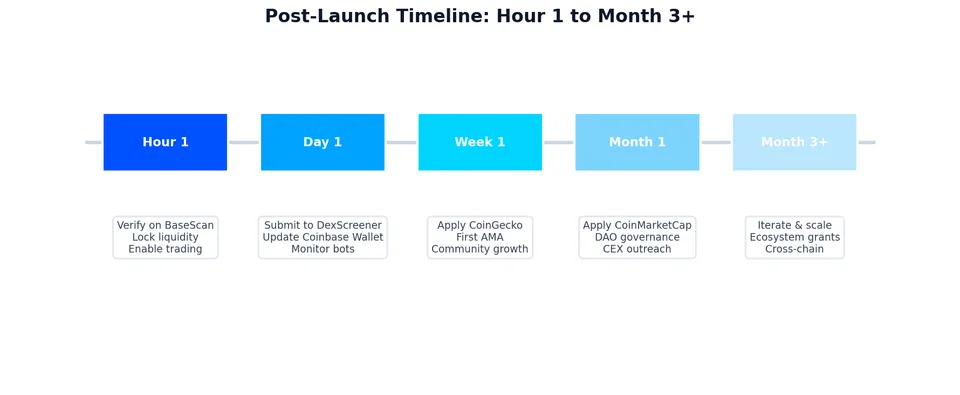
Hour 1
- Verify contract on BaseScan.
- Lock liquidity.
- Post announcement on Twitter and Farcaster.
- Enable trading (if you had a launch delay).
Day 1
- Submit to DexScreener.
- Update Coinbase Wallet token list.
- Monitor for bots and unusual wallet activity.
Week 1
- Apply for CoinGecko listing (requires $10,000+ volume, 7 days of trading, 1,500+ holders).
- Apply for CoinMarketCap (requires 2 weeks of data, active socials).
- First community AMA.
Month 1
- DAO governance proposal (use Tally or Snapshot).
- First audit results published.
- Exchange outreach (CEX listings).
Real Costs: 4 Budget Tiers
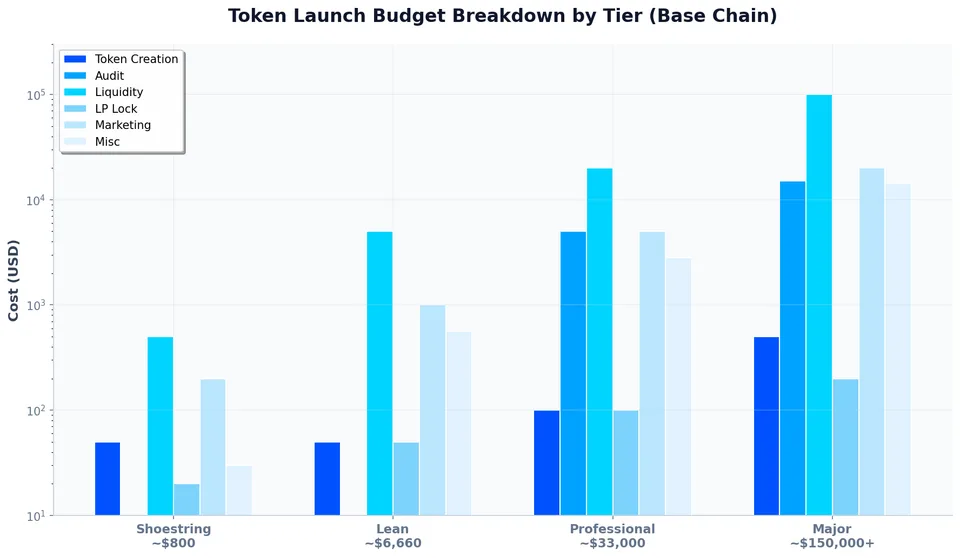
Item | Shoestring | Lean | Professional | Major |
|---|---|---|---|---|
Token Creation | $50 (Smithii) | $50 | $100 (dev) | $500 (custom) |
Contract Audit | $0 | $0 | $5,000 | $15,000+ |
Liquidity | $500 | $5,000 | $20,000 | $100,000+ |
LP Lock | $20 | $50 | $100 | $200 |
Marketing | $200 | $1,000 | $5,000 | $20,000+ |
Misc | $30 | $560 | $2,800 | $15,000+ |
TOTAL | ~$800 | ~$6,660 | ~$33,000 | ~$150,000+ |
ETH/USD estimates based on ~$3,000 ETH.
10 Mistakes to Avoid on Base
1. Not verifying on BaseScan. Traders will not touch an unverified contract.
2. Forgetting to lock liquidity. Even a 30-day lock is better than nothing.
3. Ignoring Farcaster. Base's soul lives there.
4. Choosing the wrong DEX. Aerodrome has 61% of volume; Uniswap V3 is secondary.
5. Too little liquidity. Under $1,000 makes you a sniper target.
6. No anti-bot. Bots will drain your launch in 30 seconds.
7. Keeping ownership on a single wallet. Use a Safe multisig immediately.
8. Skipping the testnet. Base Sepolia exists for a reason.
9. No tax clarity. If you have taxes, explain them clearly in your docs.
10. Over-promising. Base users are savvy. Under-promise and over-deliver.
FAQ
Do I need ETH to launch on Base?
Yes. You need ETH for gas. Budget 0.05–0.2 ETH for a standard launch.
Is Base better than Ethereum for launching?
For most projects, yes. Base is 10x–100x cheaper, faster (~2 second blocks), and has direct Coinbase distribution.
How long does it take?
No-code: 10 minutes. Developer route: 2–7 days including testing and verification.
When will my token show on DexScreener?
Usually within 1–4 hours after the first trade, if there is volume.
How do I get on CoinGecko?
You need 7 days of trading history, $10,000+ daily volume, 1,500+ holders, and an active social media presence.
What is B20?
B20 is Base's optimized token standard from the June 2026 Beryl upgrade. It reduces gas costs by 15–20% and is backward-compatible with ERC-20.
Can I bridge my token to Ethereum?
Yes, use the Base official bridge or LayerZero for cross-chain transfers.
Do I need a legal entity?
If you raise >$100,000 or sell to U.S. persons, yes. Consult a lawyer. Cayman Foundations and Swiss Vereins are common.
What is the best anti-bot strategy?
Block the first 2–3 blocks, set a max wallet of 1–2%, and use a launchpad with built-in sniper protection.
Can I launch for free?
Only on testnet. Mainnet always requires gas fees.